Getting a Security Warning?
Here's exactly what to do.
Windows Defender SmartScreen flags all new applications that don't yet have enough download history — not because they're dangerous. WaChat2PDF is verified safe by 70+ antivirus engines.
Locate WaChat2PDF-Setup-1.0.0.exe in your Downloads folder and double-click it to begin. Windows may immediately show a blue SmartScreen dialog — that's expected.
Windows shows this blue dialog for every new application not yet listed in the Microsoft Store. It does not mean the file is harmful. Follow the two steps below:
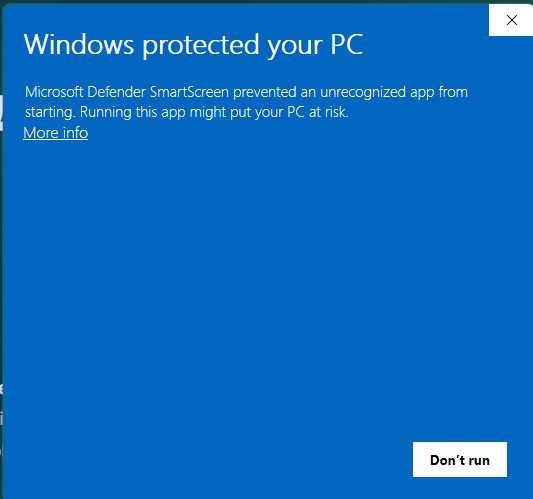
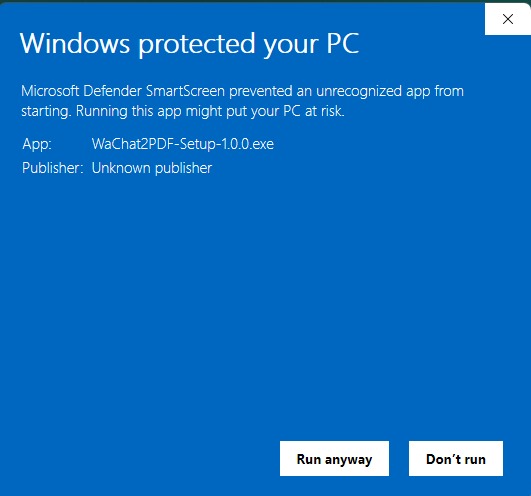
Why does this happen? SmartScreen requires an app to accumulate thousands of downloads before it stops showing this warning. As a newly released app, WaChat2PDF is building this reputation — the warning will disappear in future updates.
Once past SmartScreen, the installer launches. Click Next → Install → Finish. WaChat2PDF will open automatically and you're ready to go.
Mac blocking the app?
Here's the simple fix.
macOS Gatekeeper shows a warning for apps downloaded outside the Mac App Store. This is a standard security feature, not a sign of a problem. WaChat2PDF is safe — follow the steps below to open it.
Double-click the downloaded WaChat2PDF-macOS.dmg file. A Finder window opens — drag the WaChat2PDF icon into the Applications folder shortcut shown in the same window.
When you first try to open WaChat2PDF from Applications, macOS shows this dialog. This happens with all apps downloaded outside the Mac App Store. Click OK for now and continue to Step 3.
"WaChat2PDF.app" cannot be opened
because it is from an unidentified developer.
macOS cannot verify that this app is free of malware.
Move it to Trash or contact the developer.
Why does this happen? Apple requires a paid notarization submission for each build. As we grow, this is on our roadmap. For now, the workaround below takes under 30 seconds.
Go to Apple menu () → System Settings → Privacy & Security. Scroll down to the Security section — you'll see a message that WaChat2PDF was blocked. Click "Open Anyway" and enter your Mac password.
This is the quickest method. In Finder, right-click (or hold Control and click) the WaChat2PDF app icon → select "Open" → in the new dialog, click "Open" again. You only need to do this once.
Open "WaChat2PDF.app"?
macOS cannot verify the developer.
Are you sure you want to open it?
After clicking Open once, macOS remembers your choice. You'll never see this dialog for WaChat2PDF again.
Why WaChat2PDF is safe to install
Every release is reviewed and verified before it reaches you.
Scanned by 70+ antivirus engines on VirusTotal before every public release.
Your chat files never leave your device. All viewing and search happens fully offline.
Used by thousands of users globally to safely view and export WhatsApp chat histories.
Still having trouble? Our team responds within a few hours. Contact Support →
Full Install Guide ↗